Settings
Shipping country
Languages
Currencies
Minelab X-Terra Pro – manual & optimal settings
User manual & guide
Minelab X-Terra Pro
Manual & settings
The complete guide: assembly, initial setup, all 6 search modes, PRO-SWITCH™ frequencies, discrimination, ground balance, audio, practical tips and technical specifications – clearly and understandably explained.
Contents of this guide
Scope of delivery & assembly
Display & controls
Getting started
The 6 search modes in detail
PRO-SWITCH™ frequencies
Sensitivity & recovery
Discrimination & notch
Ground balance
Target ID & depth indication
Pinpoint function
Audio settings
Bluetooth & headphones
Vibration, lighting, flashlight
Practical tips by terrain type
Technical specifications
Frequently asked questions (FAQ)
Scope of delivery
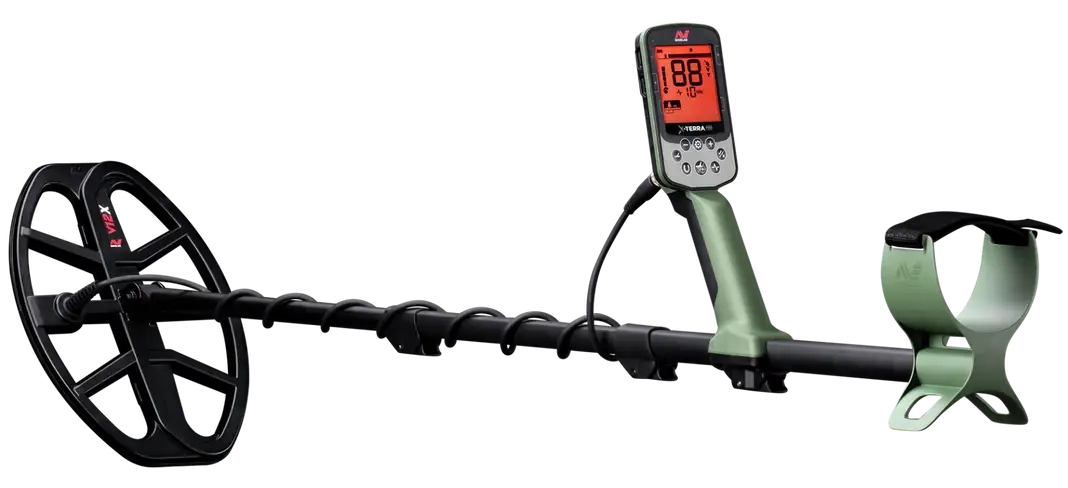
The Minelab X-Terra Pro comes with everything you need for your first outing. When unpacking, check that all parts are complete and make sure there is no damage.
X-Terra Pro control unit (control pod)
V12X™ 12"×9" (30×23 cm) DD search coil with screw kit
V12X coil cover (skid plate)
Upper telescopic shaft
Lower shaft
Armrest with hook-and-loop arm strap & mounting hardware
USB magnetic charging cable
Quick start guide
Note on underwater use: For use under water, waterproof Minelab headphones are required (available separately). These have a special connector that forms a waterproof seal on the detector. Standard headphones with a 3.5 mm jack are only suitable for use above water.
Assembly & shaft
1
Attach the search coil to the lower shaft
Push the lower shaft through the coil yoke of the V12X coil. Insert the washer and secure the connection with the nut. Tighten by hand – no tools needed. The coil should still be easy to align but should not wobble.
Align the coil parallel to the ground before searching2
Assemble the shaft
Open the camlocks (quick-release fasteners) on the shaft sections. Insert the lower shaft into the upper shaft, then the upper shaft into the control unit. Close the camlocks. The shaft is continuously adjustable from 63 to 138 cm.
Ideal length: arm hanging loosely, coil 5–10 cm above the ground3
Route the coil cable
Wind the coil cable loosely around the shaft in a spiral and plug the connector into the socket on the control unit. Turn the connector clockwise until it clicks into place. Make sure there is enough slack – the cable must not become taut when swinging.
4
Adjust the armrest
Adjust the armrest so that your forearm rests comfortably. Fasten the hook-and-loop arm strap so that the detector sits securely but can be removed quickly. The controls should be easy to reach with your thumb and index finger.
5
Charge the battery
Connect the USB magnetic charging cable to the charging socket on the control unit. Fully charge the 3.7 V / 5,100 mAh Li-ion battery before first use. The LED charging indicator shows the status. Run time: up to 18 hours (with wired headphones). Caution: do not search under water while the detector is charging.
Recharging on the go via USB power bank (0.5 A or 2 A at 5 V) is possibleDisplay & controls
The monochrome LCD display of the X-Terra Pro has a red backlight and shows all important information at a glance. The intuitive user interface makes it easy to get started even without previous knowledge.
Target ID display
119-segment scale from −19 (iron) to +99 (non-ferrous). The detected conductivity appears large and clear in the centre. Discriminated segments are hidden visually.
Search mode button
Switches between the 6 search profiles (Park 1/2, Field 1/2, Beach 1/2). The active mode is shown at the top of the display. Pressing once switches to the next profile.
Sensitivity button
Adjusts the detection depth in 25 levels (1–25). A short press opens the sensitivity control. Use the up/down arrows to adjust. The value is shown on the display.
Pinpoint button
Activates pinpoint mode for precise location of a detected object. The tone volume increases the closer the coil gets to the centre of the object. No discrimination is active in pinpoint mode.
All-metal shortcut
The horseshoe button switches immediately to all-metal mode – all discrimination is deactivated. Ideal for quickly checking whether a signal is present without permanently changing settings.
Settings / menu
Opens the main menu with access to tone settings, ground balance, noise cancel, lighting, vibration, Bluetooth and device information. Navigate with the arrow buttons.
Getting started
1
Switch on
Hold the on/off button until the display lights up. The detector starts in the search profile last used. After start-up, the Minelab logo appears briefly, followed by the active search mode.
2
Select search mode
Press the search mode button and select the appropriate profile for your terrain. For beginners, we recommend Park 1 – this profile offers the best starting point for getting to know the detector, with balanced default values.
Park 1 with 10 kHz is the ideal learning profile for beginners3
Noise cancel
Hold the coil still in the air above a metal-free area. Start the automatic noise cancel in the menu. The detector selects the channel with the least interference from 19 channels . Repeat when you change location.
4
Perform automatic ground balance
Hold the ground balance button and move the coil evenly up and down (5–25 cm above metal-free ground). The detector analyses the ground and gives a confirmation after approx. 5 pumping movements. The value appears on the display.
Repeat ground balance whenever the terrain changes5
Swing technique
Move the coil evenly parallel to the ground over a width of 40–60 cm. The X-Terra Pro is a motion detector – the coil must be moving for objects to be detected. Keep the coil 5–10 cm above the ground.
The 6 search modes
The X-Terra Pro offers 3 search modes with 2 profiles each (6 search profiles in total). Profile 1 is always quieter and more general, profile 2 is sharper and optimised for more difficult conditions.
Park
Profile 1 & 2
Coins & jewellery in populated areas
Field
Profile 1 & 2
Fields, meadows, historical sites
Beach
Profile 1 & 2
Salt water, wet sand, shallow water
Park 1
Default frequency: 10 kHz · Ideal learning profile for beginners. Offers the best mix of detecting small and large targets. Accepts all non-ferrous targets by default. Suitable for parks, school grounds and recreational areas with normal to high levels of junk.
Park 2
Default frequency: 15 kHz · Higher recovery speed for areas with lots of iron. Detects finer jewellery and small silver coins better. Recommended for old parks with a lot of junk (e.g. near grandstands or playgrounds).
Park 1
Default frequency: 10 kHz · Balanced setting for open areas. Good depth performance with medium discrimination. Ideal for coin hunting on fields and meadows. Sensitivity can be set to 20–22.
Field 2
Default frequency: 10 kHz · Increased depth for undisturbed areas. A lower recovery speed improves detection depth at the same swing speed. Suitable for historical field and woodland areas with little junk.
Beach 1
Default frequency: 8 kHz · Optimised for dry beaches and slightly damp sand. Stable operation with reduced ground noise on non-salty ground. Good for jewellery and coin hunting on bathing beaches.
Beach 2
Default frequency: 8 kHz · For wet, salty sand and shallow-water searching. Improved suppression of saltwater noise. Suitable for the transition between dry and wet areas and for use in water down to a depth of 5 m.
PRO-SWITCH™ frequency selection
The PRO-SWITCH™ technology lets you change the operating frequency at the press of a button – without changing the coil. 5, 10 and 15 kHz are available for the Park and Field modes. Beach mode works at a fixed 8 kHz.
5
kHz
Depth, large objects, militaria & deep searching
8
kHz
Beach & salt water (fixed in Beach mode)
10
kHz
All-round, coins & medium-sized objects
15
kHz
Fine jewellery, small coins, silver
Rule of thumb: Start with 10 kHz (Park 1) as an all-rounder. Switch to 5 kHz for greater depths or militaria hunting, and to 15 kHz for fine jewellery or small silver coins. The frequency selection only affects the currently active mode – the others remain unchanged.
Sensitivity & recovery speed
Sensitivity 1–10
Low – for heavily mineralised or wet ground, salty beaches, areas with EMI. The detector runs stably, but with reduced depth. A starting point for unknown areas.
Sensitivity 11–18
Medium – standard range for normal parks, meadows and fields. Good balance between depth and stability. Recommended for beginners.
Sensitivity 19–25
High – for loose, weakly mineralised ground. Maximum depth. If there is constant background noise or false signals, reduce gradually to a stable limit.
Recovery speed 1
Slow – maximum detection depth at the same swing speed. Ideal for quiet areas with little junk. Can detect weak targets at depth better.
Recovery speed 2
Medium – default setting. A balanced compromise between depth and target separation. Works well in most situations.
Recovery speed 3
Fast – improved target separation in trashy areas. Good targets hidden behind iron junk are identified better. Slightly reduced depth and ID accuracy.
Rule of thumb for sensitivity: Start at level 20 and increase gradually until the detector is just still running stably (no constant false signals without metal under the coil).
Discrimination & notch function
The X-Terra Pro's discrimination is based on the 119-segment target ID scale (−19 to +99) and allows individual conductivity ranges to be masked out precisely. Using the notch function, individual segments or entire ranges can be muted selectively.
All metal
No discrimination – all metals are signalled. Can be reached at any time via the horseshoe button shortcut. Recommended for historical sites, relic hunting and unknown areas.
Discriminate iron
All values from −19 to 0 (iron range) are masked out. Nails, screws and iron parts produce no tone. Caution: historical iron finds are not signalled either.
Notch / custom
Individual target IDs or segment ranges can be muted precisely. 30 individual discrimination segments are available (4 target IDs per segment). Example: mask out bottle caps at ID 12–16 without losing other non-ferrous metals.
Important: Any active discrimination carries the risk of missing genuine finds. Historical bronze coins, belt buckles or silver jewellery can lie in discriminated conductivity ranges. Always check unclear signals with pinpoint mode or the all-metal shortcut.
Ground balance
Correctly set ground balance is crucial for maximum depth and minimal false signals. The X-Terra Pro offers three methods: Automatic, manual and tracking.
A
Automatic ground balance (recommended for beginners)
Hold the ground balance button. Pump the coil evenly up and down 5–7 times (5–25 cm) over a metal-free patch of ground. The detector analyses and saves the optimum balance value. Typical values: sandy beach 0–20, field 50–80, humus-rich soil 80–95.
Repeat the balance at several points on inhomogeneous groundB
Manual ground balance
The ground balance value can be entered manually in the menu. This is useful if the automatic balance fluctuates (e.g. due to roots, stones or metal debris in the ground). Recommendation for heavily mineralised ground: set it manually and note the value.
C
Ground tracking (automatic adjustment)
The detector continuously adjusts the ground balance to changing ground conditions during the search. Particularly suitable for terrain with highly variable ground properties. Caution: tracking can become sluggish with very slow swing movements.
Target ID & depth indication
The X-Terra Pro shows the conductivity (target ID) of every detected object on the 119-segment scale from −19 to +99 . Negative values stand for ferrous objects, positive values for non-ferrous and precious metals.
−19 to 0 (iron)
Nails, screws, iron finds, canisters. Low negative values are typical of small iron parts. Strongly negative values indicate larger iron finds.
→ Usually skip1 to 50 (medium non-ferrous)
Aluminium, bottle caps (10–18), small copper coins, foil (20–30), medium-sized non-ferrous finds. This range contains a lot of junk, but also genuine finds.
→ Check carefully51 to 99 (high conductivity)
Copper and bronze coins (50–75), silver coins (80–92), jewellery depending on the alloy, large copper objects. Values above 80 are almost always worth digging.
→ Always digDepth indication: The detector shows the estimated object depth in 5 levels . The indication is based on signal strength – weaker signals mean greater depth. This display is a guide value, not an exact measurement.
Pinpoint function
1
Locate the signal and activate pinpoint
As soon as the detector gives a signal, press the pinpoint button. The mode switches to precise location – discrimination is deactivated and sensitivity increased. The tone becomes stronger the closer the coil gets to the centre of the object.
2
Cross-check from two directions
Approach the object with the coil from two different directions. The point at which the signal is strongest from both directions marks the exact position of the object. Mark the spot with your foot or a small object.
Cross-checking achieves an accuracy of ±2–3 cm3
Excavation and re-check
Dig specifically at the marked spot. After digging: hold the soil over the coil and carry out another pinpoint check – is the object in the spoil? This saves you unnecessary further digging.
Audio settings
1 tone
All metals produce the same tone – regardless of conductivity. Simple, for beginners to get to know the detector. Little target information, but clear and free of interference.
2 tones
Low tone for iron (−19 to 0), high tone for non-ferrous metal (1–99). A first useful distinction without any learning effort. Recommended for beginners after the first few hours.
5 tones
The scale is divided into 5 tone groups. More target information thanks to different pitches for each conductivity range. A good compromise between simplicity and information density.
All tones (AT)
Each conductivity produces its own proportional tone. Maximum target information – requires experience to interpret correctly. Recommended for advanced detectorists.
Depth proportional (dP)
Tone volume and pitch vary with signal strength. Weak signals (deep objects) sound quieter, strong signals louder. Helpful for estimating the depth of a find while still swinging.
Bluetooth, vibration & lighting
Bluetooth (ML 85)
Pairing with the Minelab ML 85 Bluetooth headphones (low latency). Activate via the wireless audio button. Hold the middle button on the ML 85 until the LED flashes red/blue. The connection is established automatically. Range approx. 5–10 m. Use above water only.
Vibration in the handgrip
The handgrip vibrates with every metal detection – even without headphones and without audio. Ideal for hearing-impaired users, underwater searching or noisy environments (e.g. a beach with music). Can be switched on/off in the menu.
Display & keypad backlight
Red LCD backlight in two levels (high/low). Keypad backlight also in two levels. Allows reading and operation at dusk or in the dark without restriction.
Flashlight (control pod)
Integrated LED flashlight on the back of the control pod – illuminates the swing area of the search coil. Activated via the menu. Handy for night searches and for lighting up a find.
Battery & charging
Internal 3.7 V / 5,100 mAh lithium-ion battery. Run time: up to 18 h (wired) / approx. 12 h (Bluetooth active). Charging via USB magnetic cable or during searching via power bank. Do not charge under water.
Practical tips by terrain type
Park / playground
Mode: Park 1 · Frequency: 10 kHz · Sensitivity: 18–20 · Discrimination: Iron off or custom · Recovery: 2–3 · Tip: bottle caps often at ID 12–16 – mask them out specifically using notch. Silver coins usually lie at 80–92.
Field / meadow
Mode: Field 1 · Frequency: 10 kHz · Sensitivity: 20 · Discrimination: All metal · Recovery: 2 · Tip: swing slowly on arable land and carry out ground balance regularly. Deep coin finds at 30+ cm are possible.
Beach / salt water
Mode: Beach 2 · Frequency: 8 kHz (fixed) · Sensitivity: 16–18 (wet) / 20–22 (dry) · Tip: carry out a separate ground balance for salt water. In the water: connect waterproof headphones and activate vibration as additional feedback.
Historical sites
Mode: Field 2 · Frequency: 5 kHz (for great depths) or 10 kHz · Sensitivity: 20–22 · Discrimination: All metal · Recovery: 1–2 · Tip: never discriminate too strongly – historical iron finds can be valuable indicators of a site.
Militaria / deep searching
Mode: Field 1 or Field 2 · Frequency: 5 kHz · Sensitivity: 22–24 · Discrimination: All metal · Recovery: 1 · Tip: 5 kHz is optimised for large, deep-lying iron parts. Do not ignore weak signals – Second World War helmets or cartridges often lie deep.
Technical specifications
Technology
PRO-SWITCH™ single-frequency VLF (selectable frequencies)
Search modes
Park 1 & 2 · Field 1 & 2 · Beach 1 & 2 (6 profiles)
Operating frequencies
Park/Field: 5 / 10 / 15 kHz · Beach: 8 kHz
Target ID (TID)
119 segments: iron −19 to 0 · non-ferrous 1 to 99
Discrimination segments
30 segments (4 target IDs each)
Sensitivity
1 – 25 levels
Ground balance
Automatic · manual · tracking
Noise cancel
Automatic (19 channels)
Recovery speed
1 · 2 · 3 (3 levels)
Depth indication
5 levels
Target tones
1 · 2 · 5 · All tones (AT) · Depth proportional (dP)
Bluetooth
Yes (low latency, ML 85 recommended)
Audio connection
Built-in speaker · 3.5 mm wired · wireless BT
Vibration
Yes (handgrip, can be switched on/off)
Lighting
Red LCD + keypad light (2 levels) · control pod flashlight
Battery
3.7 V / 5,100 mAh lithium-ion (internal, USB magnetic charging)
Battery life
approx. 16–18 h (wired) / approx. 12 h (Bluetooth)
Weight
1.3 kg (incl. search coil)
Shaft length
63 cm (collapsed) to 138 cm (extended)
Search coil (supplied)
V12X™ 12"×9" (30×23 cm) elliptical DD, IP68
Compatible coils
V8X™, V10X™, V12X™ · all EQUINOX® coils
Water protection
IP68 – fully submersible to 5 m
Operating temperature
−10 °C to +40 °C
Storage temperature
−20 °C to +70 °C
Search profiles
6 profiles (2 per mode)
Warranty
3 years (control unit & coil)
Manufacturer
Minelab Electronics Pty. Ltd., Adelaide, Australia
Frequently asked questions (FAQ)
Is the X-Terra Pro a multi-frequency machine?
No. The X-Terra Pro uses PRO-SWITCH™ single-frequency VLF – one of four frequencies is transmitted at a time (5/8/10/15 kHz). This is not simultaneous multi-frequency. The advantage: in expert hands, a deliberately chosen single frequency often offers clear advantages in target response for certain metals.
Can I use EQUINOX coils?
Yes. The X-Terra Pro is compatible with all coils in the EQUINOX® series , in addition to its own V coils (V8X™, V10X™, V12X™). This considerably expands its range of uses.
How long does the battery last?
With wired headphones approx. 16–18 hours. With Bluetooth and lighting active approx. 12 hours. Recharging on the go via power bank while searching is possible (USB, 0.5 A or 2 A at 5 V).
Can I search under water?
Yes – detector, coil and control pod are IP68-certified to a depth of 5 m. For underwater searching, waterproof Minelab headphones must be used (available separately). Vibration in the handgrip is a practical alternative for signal feedback.
What do negative target IDs mean?
Values from −19 to 0 indicate ferrous objects. The more negative the value, the larger or more strongly magnetic the iron object. These values can be masked out using discrimination.
What can I do about constant background noise?
1. Run noise cancel again (hold the coil still). 2. Reduce sensitivity by 2–3 levels. 3. Redo the ground balance. 4. Switch to a lower recovery speed. 5. With extreme mineralisation, use manual ground balance.
Strengths at a glance
What sets the X-Terra Pro apart
- PRO-SWITCH™ – 4 selectable frequencies (5/8/10/15 kHz) without changing the coil
- 119-segment target ID scale for precise metal identification
- 6 pre-programmed search modes (Park, Field, Beach, 2 profiles each)
- IP68 fully waterproof to 5 m – on land and in water
- Compatible with EQUINOX® search coils (large selection)
- Integrated speaker + Bluetooth (ML 85) + 3.5 mm socket
- Vibration in the handgrip – ideal for underwater use and hearing-impaired users
- Flashlight and lighting for night and dusk searches
- 5,100 mAh battery – up to 18 hours run time
- Can be recharged via power bank while searching
- Only 1.3 kg and compact, collapsing to 63 cm
- 3-year warranty on control unit and coil
Minelab X-Terra Pro – buy now
Available at metalldetektoren.de – fast DHL shipping, personal expert advice and 30-day returns. Order by 1 pm on working days for same-day dispatch.
Recommend usShare now
Contact
Metalldetektoren.de
Andreas Licht
Professor-Derra Str. 3
96465 Neustadt b. Coburg
Germany
Phone advice (CET)
Mon – Thu9:00 – 17:00
Friday9:00 – 12:00
Sat – Sunclosed
Our service
Information
- Delivery time
- Payment & shipping
- My quick purchase
- Privacy and data protection
- Authenticity of customer reviews
- Terms and conditions
- Battery Act notice
- Cookie settings
Our brands







Payment: